Choose a record type before recording the amount
Use separate rows for a vehicle purchase, a capacity upgrade and a reward. The same wallet can change for different reasons; a nearby dealership or vehicle name does not identify the cause.
The code and slot examples come from an August 29, 2026 upload. The police receipt comes from a February 27, 2026 upload.
| Field to keep | What to enter |
|---|---|
| Action and result | Exact selected item or reward label, then success or failure |
| Cash | Wallet before, wallet after and the displayed amount |
| Other units | Points or slot capacity in their own fields |
| Conditions | Visible modifiers, source date and version if actually shown |
| Time | Observed start and finish for a rate; leave blank for an untimed receipt |
A slot upgrade is a capacity cost, not a vehicle price
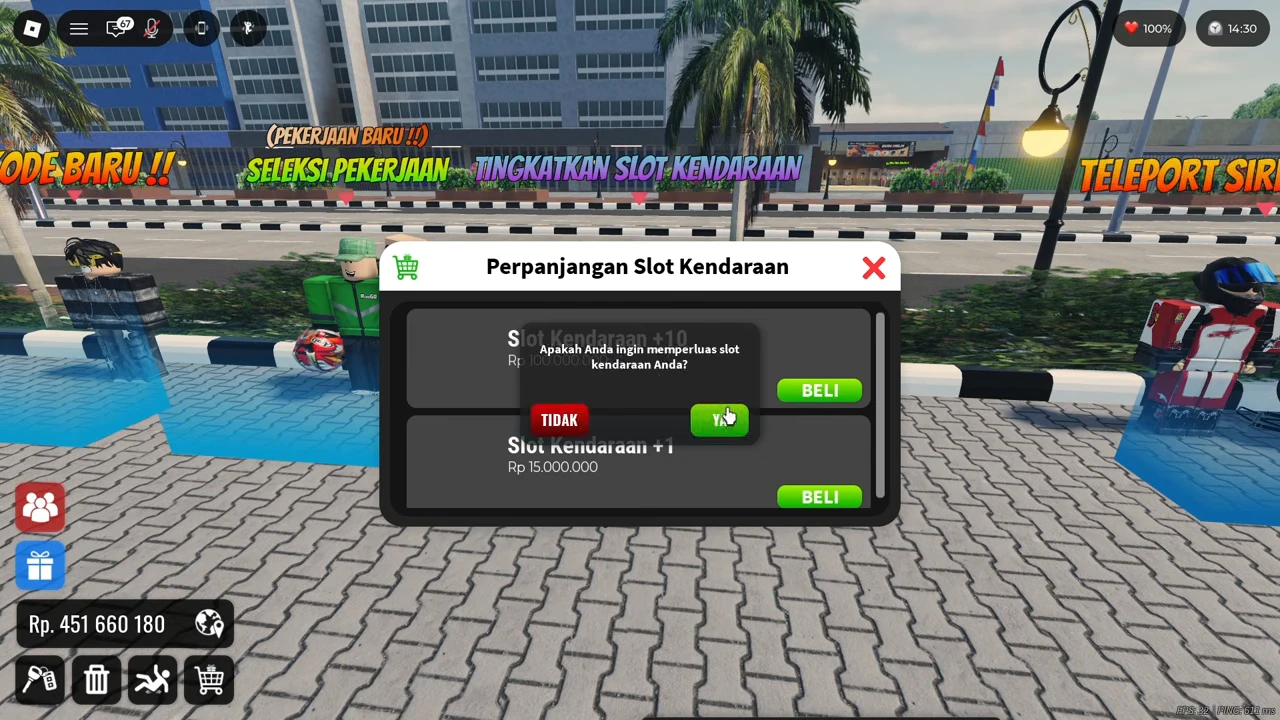
The recorded account first shows a full-slot warning and Slot 33/33. Later, the Perpanjangan Slot Kendaraan panel offers Slot Kendaraan +10 for Rp100,000,000 and +1 for Rp15,000,000. The player confirms the +10 option with YA.
The success message reports 10 slots added and a total of 43. The wallet changes from Rp451,660,180 before confirmation to Rp351,660,180 after the update: a Rp100,000,000 deduction. Record the capacity change alongside the cost; this is not payment for the previously viewed motorcycle.
For your own intended upgrade, use the vehicle-slot NPC marked TINGKATKAN SLOT KENDARAAN and the displayed Upgrade Slot Kendaraan prompt. Read your own option and confirmation price before accepting. The recording cuts between the dealership and plaza, so it does not supply a continuous walking route.
Wait for the wallet and capacity result
The later frame shows both the total of 43 slots and the updated Rp351,660,180 wallet. Calculate 451,660,180 − 351,660,180 = 100,000,000, then retain the +10 capacity result in a different column.
For this purchase, 100,000,000 ÷ 10 is Rp10,000,000 per added slot. That is arithmetic for the observed bundle, not a claim that every slot option or future purchase has that unit price.

Check receipts in the opposite direction
The recorded NEWLIGHTSMODIFICATION redemption changes the wallet from Rp331,495,904 to Rp351,495,904 and returns a successful-redemption message with +Rp20,000,000. Here, after minus before matches the displayed reward.
Keep this as a dated successful receipt, not a recurring income rate or a guarantee that the code still works. Follow the redemption controls on the linked page if you want to check the candidate in your own session.
Keep cash, points and modifiers separate
The police recording displays Mission Accomplished with Rp992,778, +15 Points and (2x Earning) in the same result. Preserve all three fields in the record.
Do not add 15 to the cash amount or present the receipt as an unmodified base payout. The label alone does not establish how every reward component is multiplied. This selected result also lacks a measured full mission duration and before-and-after wallet reconciliation; it supports a displayed payout, not a verified cash-per-minute rate.

Measure a rate only when you have the whole interval
For a repeatable earning comparison, choose the interval before starting. Include the time needed to accept, travel, complete and collect if those steps are part of the loop you are comparing. Keep a one-off purchase outside that interval or record it as an expense.
Net cash per minute = (cash receipts − cash expenses) ÷ elapsed minutes. If the interval contains no other wallet changes, the wallet difference can check the net amount. Do not count both that difference and the same receipt again.
Leave a rate unfilled when timing or costs are missing. Compare repeated runs under recorded conditions before describing one method as better. The examples above verify transaction records; they do not establish a fastest earning route.
- Name the action and decide whether you need a price, receipt or rate.
- Record the initial wallet and any starting capacity or points.
- Capture the selected option, result and updated state.
- Keep the amount, unit and visible modifier together.
- Reconcile the change; flag a mismatch without guessing a correction.
- For a rate, record the full chosen interval and all cash expenses.