Open the game’s code panel
The recorded interface is Indonesian. Toko is the shop panel; Tukar is the redemption tab. Use the shopping-cart icon in the game interface to open Toko, then select TUKAR. The input and its submission control are inside that panel. This sequence was observed in the creator’s v1.1.8 recording; it was not independently played on this account.
Submit one complete code
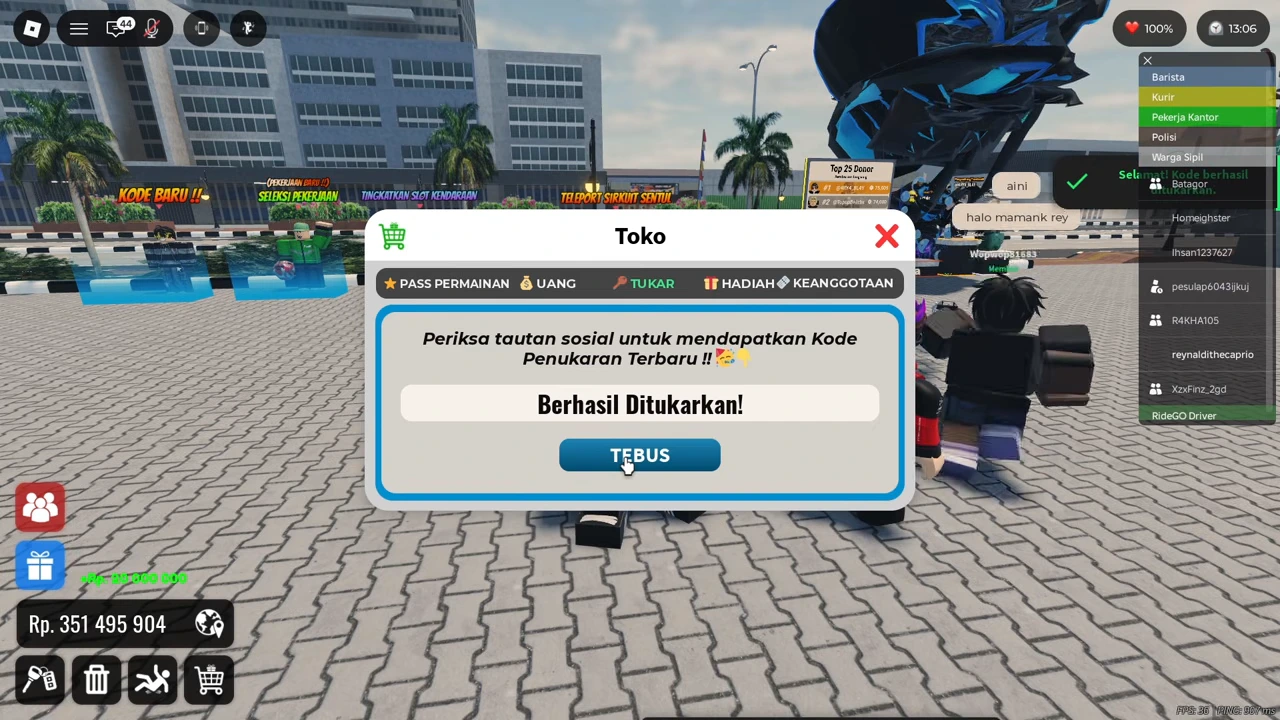
Enter the code without surrounding spaces, then use the submission control beside the field. Read the resulting message before entering another code. The illustrated example enters NEWLIGHTSMODIFICATION; the subsequent green message confirms that this submission succeeded in that recorded session.
Confirm the result in the wallet
The wallet changes from Rp331,495,904 to Rp351,495,904: an increase of Rp20,000,000. That arithmetic supports this one recorded payout. It does not establish the rewards of other codes or whether an already-redeemed account can claim it again.
| Observed check | Recorded result |
|---|---|
| Code | NEWLIGHTSMODIFICATION |
| Returned message | Berhasil Ditukarkan! |
| Wallet before → after | Rp331,495,904 → Rp351,495,904 |
| Difference | Rp20,000,000 |
When the game does not report success
Use the exact response displayed by your session. The observed footage does not demonstrate expired-code, duplicate-code or invalid-code messages, so this guide does not assign those causes to an unfamiliar error. Recheck the string against the official description and keep your result separate from this dated video example.